What Is a Drip Email Campaign? Drip Campaigns Meaning in Plain English
A drip email campaign is a set of emails written in advance and sent automatically over time. The name comes from the idea of a slow, steady drip instead of one big flood. Someone joins your list, and instead of getting a single message followed by silence, they receive a short run of emails spaced out over days or weeks.
If you have ever wondered what is an email drip campaign, what is drip email, or what is drip campaigns because a coworker used the phrase in a meeting, that is really all it is. You write the emails once, set the timing, and your email marketing software does the sending. People also call these automated drip campaigns, drip emails, or simply drip marketing, and they are the simplest form of email automation campaigns.
What does campaigning mean in email marketing?
A campaign is a planned set of messages aimed at one goal, with a defined audience, a start point, and a way to measure the result. A drip campaign is a campaign where the messages follow a built-in schedule instead of going out all at once.
What a drip looks like in practice
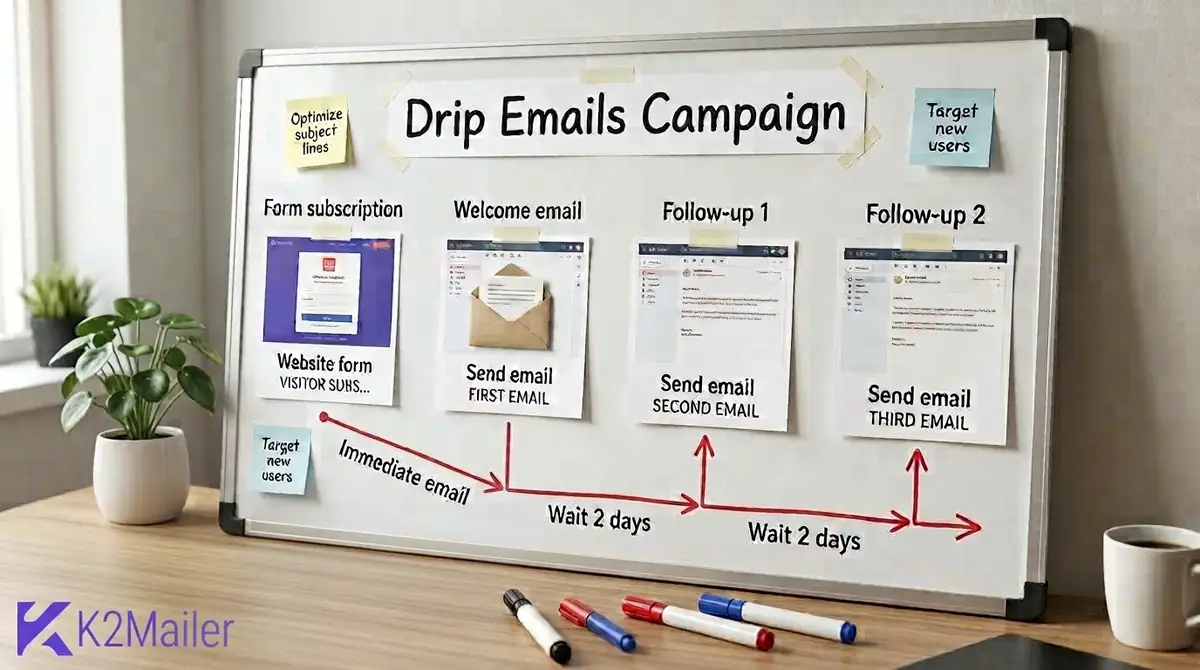
Picture the whiteboard in the image above. A visitor fills in a website form. A welcome email goes out immediately. A first follow-up lands two days later, and a second follow-up arrives two days after that. Three or four emails, one clear path, and nobody on your team has to remember to press send.
The quick test
If the emails were written ahead of time and each person receives them on their own timeline, starting from the moment they joined, it is a drip. If you hit send on one message to everyone on the same day, it is a broadcast.
Why Drip Campaigns Turn Leads Into Customers
Here is the uncomfortable truth about most signups: they were curious, not committed. Someone downloaded your checklist at 11 pm, got distracted, and forgot your name by breakfast. One follow-up rarely fixes that.
Drip campaigns work because they match how people actually decide. Most buyers need to see a problem described accurately, trust the person describing it, and then see a clear next step. The path from lead to customers is rarely one email long. Spread across several emails, it happens without pressure. It is also how marketing drip campaigns move a lead into customer status without depending on someone on your team remembering to follow up.
Reach people while their interest is still fresh
Earn confidence with useful emails before you ask for anything
Every new lead gets the same follow-up, even at 3 a.m.
- They fix the "who are you again?" problem. A welcome email and a couple of follow-ups keep your name familiar.
- They scale the follow-up you already do by hand. If you write the same three emails to every new lead, a drip does it for you.
- They produce clean data. Because every contact sees the same sequence, you can compare steps and fix the weak one.
What drip campaigns cannot do
They cannot rescue a weak offer, a stale list, or a domain with a poor sender reputation. If your emails land in spam, even the best sequence never gets read. We cover that later in this guide.
Drip Campaigns vs Nurture Campaigns (and Other Email Types)
These terms get mixed up constantly, so here is the cleanest way to separate them. A drip campaign is defined by time: send step one, wait, send step two, wait, send step three. Email marketing drip campaigns also sit alongside newsletters and one-off promotions, but they behave very differently because each person starts the clock when they join. A nurture campaign is defined by the buyer: what they clicked, which stage they are in, and what they care about. The two overlap a lot, and most real programs use both.
| Type | What triggers the next email | Best for | Example |
|---|---|---|---|
| Drip campaign | A fixed delay after the previous step | Welcome series, onboarding, course-style education | Email 1 now, email 2 after 2 days, email 3 after 4 days |
| Nurture campaign | Lead behavior, interest, or stage | Moving leads toward a decision over weeks or months | A different follow-up for someone who viewed pricing than for someone who only read a blog post |
| Newsletter or broadcast | You, on a date you choose | Updates and promotions sent to many people at once | A monthly product news email |
| Triggered email | A specific event or date | Single, timely messages | A renewal reminder |
| Transactional email | A customer action that needs a system message | Receipts, password resets, shipping confirmations | An order confirmation |
Transactional email is different from drip marketing. Receipts and password resets exist to complete something the customer already did, so keep them separate from promotional sequences and avoid stuffing them with offers. Rules for commercial and transactional messages vary by country, so check the requirements that apply to you.
So which one do you need first?
Start with a drip. It is simpler to build, easier to test, and it gives you data. Once you know which steps earn clicks, you can add behavior-based rules on top. That is the natural path from a basic drip to a full nurture program, and it is the same progression we walk through in our guide to email marketing automation workflows.
Drip Marketing Examples You Can Copy
Ideas are easy. Seeing the sequence laid out is what helps. These drip marketing examples cover the situations we run into most often, and each one doubles as a drip campaigns example you can adapt this week.
Welcome series
Three to five emails after signup. Introduce yourself, deliver what you promised, and show the quickest win.
Lead magnet follow-up
Deliver the download, then send two or three emails that help the reader apply it, ending with a soft offer.
Free trial onboarding
Guide new trial users to the first key action, then a second feature, then answer the upgrade questions.
Educational email course
One lesson per email over five to ten days. Great for building authority and a habit of opening your mail.
Post-purchase sequence
Thank you, how to get the most from the product, a request for feedback, then a relevant cross-sell.
Abandoned cart reminders
One to three reminders after someone leaves items behind. Your store must pass the cart event to your email platform.
Re-engagement drip
Two or three emails to subscribers who went quiet, ending with a clear choice to stay or leave.
Event follow-up
Reminders before a webinar, a replay link after, and a different message for people who did not show up.
Notice the pattern. Each flow has a clear starting event, a small number of emails, and one outcome. That structure is what keeps a sequence from turning into noise.
Reality check
Flows such as abandoned cart and post-purchase depend on event data that your store or app has to send to your email platform. A pure time-based drip cannot see a purchase on its own. Check what your platform can detect before you plan around it.
Drip Campaigns for Real Estate: A Sequence for a Long Sales Cycle
Real estate is one of the best fits for drip marketing campaigns because decisions take months and leads often go cold between conversations. An agent who disappears after the first inquiry loses to the one who stays helpful.
Here is a simple structure for drip campaigns for real estate, written for a buyer who inquired about a listing:
| Timing | Purpose | |
|---|---|---|
| Immediately | Thanks for your inquiry | Confirm you received it, share the listing details they asked about, and say what happens next |
| Day 2 | Neighborhood guide | Schools, commute, and local amenities, so they can picture living there |
| Day 5 | The buying process, explained | Pre-approval, offers, inspections, and closing in plain language |
| Day 10 | Similar homes | Three listings that match their search, with one clear link to book a viewing |
| Day 21 | Local market update | A short update and an invitation to reply with questions |
| Day 45 | Personal check-in | A short note asking if their plans have changed |
These timings are a starting point to test against your own market and lead quality.
Sellers need a different track: how a valuation works, how to prepare a home for sale, and recent local sales. Split buyers and sellers into separate lists or segments from the first form, so a seller never receives tips on mortgage pre-approval.
Do not skip consent
Only add people who agreed to hear from you, include a working unsubscribe link, and use accurate sender details. Those rules apply to real estate email exactly as they do everywhere else.
The Core Components of an Effective Drip Campaign
Strip away the tools and every good drip has the same parts. When a sequence underperforms, one of these is usually missing.
- A single goal. Book a demo, make a first purchase, finish onboarding. One goal per drip.
- A defined audience. Decide who enters, and who should never enter.
- An entry trigger. A form signup, a list join, a segment match, or a date.
- A sequence of emails with one job each.
- Delays between emails that match how quickly your buyers decide.
- A clear call to action in every message.
- Exit rules. What stops the sequence, such as a purchase, a reply, or an unsubscribe.
- Measurement. Per-step clicks, conversions, unsubscribes, and bounces.
How to Set Up a Drip Campaign, Step by Step
People often search for how to set up drip campaign workflows and land on feature lists instead of a process. This is the process we use whenever a sequence is built from scratch. It works in any platform, and the K2Mailer-specific details come in a later section.
Pick one goal and one audience
Write the goal as a sentence, such as "New trial users should send their first campaign within seven days." If you cannot say the goal in one sentence, the drip is trying to do too much.
Choose the entry trigger
Decide what puts someone into the sequence. A form submission, joining a specific list, or a date. The trigger should line up with the moment their interest is highest.
Map the sequence on paper first
List each email, its single job, and the delay before it. Three to five emails is a sensible first draft.
Write each email to do one thing
One idea, one link, one call to action. Write the subject line last, after you know what the email is really about.
Set the delays
Use short gaps early (same day, then two days) and longer gaps later. Match the pace to your sales cycle, not to your own impatience.
Add exit rules and check your sending setup
Decide who should leave the sequence. Then confirm your sending domain is authenticated with SPF, DKIM, and DMARC and that your list is clean.
Test, launch, and review each step
Send test emails to a few inboxes and devices, check every link, then launch. Review step-level results after a meaningful batch of contacts has gone through, not after a day.
A sample five-email welcome drip
| Timing | Job | Example subject line | |
|---|---|---|---|
| 1 | Immediately | Welcome and deliver what they signed up for | Your checklist is inside (plus one quick tip) |
| 2 | 2 days later | Share a quick win | The 10-minute fix most people skip |
| 3 | 2 days after that | Show a common mistake | What most beginners get wrong |
| 4 | 3 days after that | Handle the main objection | Is this really worth your time? |
| 5 | 4 days after that | Make one clear offer | Ready for the next step? |
Treat these as test starting points, not rules.
Write the first email like you are replying to a friend
Short paragraphs, plain words, one link. If it reads like a press release, rewrite it. The first email in a drip reaches the most people, so it deserves the most care.
Build your first drip email campaign
Set up a drip, connect your sending domain, and test it on a small list before you send to everyone.
How Many Emails Should a Drip Campaign Have?
There is no magic number, and anyone who quotes one with total confidence is guessing. As a starting point, welcome and lead magnet sequences usually run three to five emails, onboarding runs four to seven, and re-engagement runs two to three. Long B2B nurtures can run longer, but only when every email earns its place.
| Sequence type | Typical length | Typical spacing | Why |
|---|---|---|---|
| Welcome series | 3 to 5 emails | Day 0, then every 2 to 3 days | Attention is highest right after signup |
| Lead magnet follow-up | 3 emails | Day 0, day 2, day 5 | Help them apply the resource, then make a soft offer |
| Trial onboarding | 4 to 7 emails | Tied to trial days and key actions | Users need guidance before the trial ends |
| Re-engagement | 2 to 3 emails | Every 3 to 5 days | Short, so you do not irritate people who drifted away |
| Long B2B nurture | 6 to 12 emails | Every 1 to 2 weeks | Complex decisions often involve several people |
These are test starting points. Your own click and unsubscribe data should decide the final length.
A practical rule: if the last two emails in a sequence earn almost no clicks and a noticeable number of unsubscribes, cut them.
Subject Lines and Copy That Get Drip Emails Opened
Strong drip campaigns emails share one trait: each message has a reason to be opened. Curiosity is the cheapest hook you have, but curiosity without a payoff trains people to ignore you, so aim for a specific promise and then keep it.
- Name the result: "A three-email follow-up you can write in 20 minutes".
- Open a loop and close it inside the email: "The one setting that quietly breaks most drips".
- Ask a real question: "Did the checklist help?"
- Be plain: "Your next step" often beats a clever pun.
Test step one first
Run a split test on the first email. It reaches the most people, so a small improvement there carries through every step after it.
In the body, lead with the reader's situation, not your product. One link and one button is plenty. Write as if you are writing to one person, not 10,000.
Common Drip Campaign Problems and How to Fix Them
This is where first-time builders get stuck. The same issues show up again and again, so use this table as a quick diagnosis.
| What you see | Likely cause | What to do |
|---|---|---|
| Very low opens on email 1 | Unauthenticated domain, a new domain with no history, or a weak subject line | Check SPF, DKIM, and DMARC, start with engaged contacts, and test subject lines |
| Unsubscribes jump at email 3 or 4 | Too frequent, off topic, or too salesy | Widen the gap, tighten the topic, and move the pitch later |
| Old subscribers received the welcome series | The drip was started for existing contacts as well as new ones | Scope it to new contacts only (in K2Mailer, set Send to existing to No) |
| Emails are not sending at all | A wrong or disconnected sending server, lists, or inactive steps | Verify the sending server, lists, and step status before activating |
| Customers keep getting sales emails | No exit rule | Remove buyers from the list or exclude them with a segment |
| Open rates look unusually high | Mail privacy features load tracking pixels automatically | Judge by clicks and conversions, not opens alone |
Open tracking has been unreliable since Apple Mail Privacy Protection launched in 2021, because it can preload images and register opens that never happened.
The "send to existing" mistake is the one we would flag first. In K2Mailer drip scheduling, choosing Yes enrolls every current contact in the selected lists right away. For a brand-new nurture series that may be exactly what you want. For an always-on welcome series, it usually is not.
Lessons from building and fixing drips
Starting too big
People plan twelve emails before sending one. Launch with three, learn from the clicks, then extend.
Writing for the company
Emails about "our features" lose to emails about the reader's problem. Rewrite from their side.
Forgetting the exit
A sequence with no stop rule will eventually pitch someone who already bought.
Skipping the test inbox
Send tests to Gmail, Outlook, and a phone. Broken links and clipped layouts show up fast.
Never looking again
A drip is set and forget only for the sending. Review each step monthly at first.
Ignoring the list
Sending to old, unverified addresses hurts reputation before the sequence even starts.
Automated Drip Campaigns: Deliverability and Compliance Basics
A drip only works if it reaches the inbox. Because drip automation sends on its own, a deliverability problem can keep damaging your sender reputation for weeks before anyone notices. Four habits protect you.
Authenticate your sending domain
Publish SPF and DKIM records for your sending domain, then add a DMARC policy. Gmail and Yahoo expect this from bulk senders, and Google's own email sender guidelines spell out the details, including one-click unsubscribe for marketing mail and keeping spam complaint rates low. The usual target is under 0.1%, and never reaching 0.3%.
Handle bounces and keep a suppression list
Remove hard bounces right away and never email suppressed addresses again. Repeated sends to dead addresses hurt reputation, and a drip will keep doing it automatically if you let it. Verify addresses at import and run list hygiene regularly.
Make unsubscribing easy and honor it
In the United States, the FTC's CAN-SPAM compliance guide requires a clear way to opt out and says you must honor requests within 10 business days. Google's bulk sender rules expect large senders to process unsubscribes within two days. Laws in other regions, such as GDPR and CASL, have their own requirements, and this guide is general education, not legal advice.
Protect sender reputation
Start with engaged contacts, ramp volume gradually on a new domain, and watch complaint and bounce rates. Our guide on how to improve email deliverability walks through authentication, warm-up, and list hygiene in detail.
Segmentation and Subscriber Management: Right Drip, Right Person
A generic drip is a weak drip. Even basic contact segmentation by source, interest, role, or customer status lets you send different sequences to people with different needs: buyers and sellers, trial users and newsletter readers, prospects and customers.
- Capture interest at signup with a dropdown or separate forms.
- Use custom fields such as role, industry, or product interest to personalize and segment.
- Keep customers out of acquisition drips.
- Keep the list clean: verify addresses, remove bounces, and suppress unsubscribes and complainers.
Everything starts with where subscribers come from. If growth is still your bottleneck, our guide on how to build your email list covers lead magnets, forms, and consent.
Website visitors who are not ready to share an email address can still be reached. If you run a WordPress site, PushWave web push notifications let opted-in visitors receive browser alerts as a separate channel. It does not replace email, and it works from a browser subscription rather than an email address. The AI Chat Assistant can capture visitor details in conversation, and those leads can be exported and imported into a list so they enter the right drip.
Campaign Analytics: How to Measure a Drip Campaign
Judge a drip by step, not just as a whole. A sequence average hides the single weak email that is dragging everything down.
| Metric | What it tells you | Watch for |
|---|---|---|
| Click rate per step | Whether the message and call to action are interesting | A steep fall between steps |
| Conversion rate | Whether the sequence achieves its goal | Compare against leads who never entered the drip |
| Unsubscribe rate | Whether frequency or relevance is off | Spikes at one specific step |
| Bounce rate | List quality and address validity | Any sustained rise |
| Spam complaints | Sender reputation risk | Anything near 0.1% |
| Open rate | Rough subject line interest | Unreliable because of mail privacy features |
If your volume allows, keep a small holdout group that does not receive the drip. Without a comparison group, you cannot say the sequence caused the lift in sales.
Drip Email Campaign Software: What to Look For
Plenty of platforms can run automation drip campaigns. The differences show up in the details, so run through these questions before you commit to any drip email campaign software.
| Question to ask | Why it matters |
|---|---|
| Can I build multi-step sequences with delays? | This is the core of any drip. |
| How do contacts enter a sequence? | Form signup, list join, segment match, date, or API. Entry options define what you can automate. |
| Can I stop the sequence for some people? | Exit rules prevent awkward sales emails to existing customers. |
| What sending and authentication controls exist? | Domain authentication, sending server controls, and bounce handling protect delivery. |
| Are bounces and suppressions handled automatically? | Automatic handling keeps a drip from repeatedly emailing bad addresses. |
| How detailed is the analytics? | Per-step results are how you improve. |
| What do automation features cost at my volume? | Plans and limits change, so compare current pricing, not memory. |
Established platforms such as Mailchimp, ActiveCampaign, Brevo, HubSpot, and MailerLite all offer automation features, and they differ in depth, pricing, and limits. K2Mailer is an affordable option for bulk senders who care about deliverability controls, and it is one of several worth comparing against your checklist.
Building a Drip in K2Mailer: A Quick Walkthrough
Since K2Mailer is the tool we know best, here is how the pieces fit together, including the limits.
- Create and save each email as a campaign first.
- Add drip steps to a drip group. Each step picks one saved campaign and sends instantly or after a set number of minutes, hours, or days.
- Start the drip by choosing the lists, the sending server, and whether existing contacts can enter.
- Optionally use a trigger to start a drip when a contact joins a list, matches a segment, or reaches a date.
- Use an auto follow-up for a single timed message, such as people who opened but did not click.
Worth knowing: K2Mailer treats drips, triggers, auto follow-ups, and split tests as separate tools rather than one visual builder with branching paths. For behavior-based variations, build segments and pair them with auto follow-ups. You can see how they fit together on the email automation features page.
Your Next Step: Launch a Small Drip This Week
You do not need a perfect strategy to start. Pick one audience, write three emails that each do one job, set sensible delays, and launch to a small group. Real clicks will teach you more than another planning session.
That is the heart of drip email campaigns: staying useful until someone is ready. Do that consistently, protect your sender reputation, and measure each step, and your leads have a clear path toward becoming loyal customers.
Frequently Asked Questions
What is a drip email campaign?
A drip email campaign is a series of pre-written emails that send automatically on a schedule or after a trigger, such as a new signup. Each message has one purpose, and together they guide a lead toward a goal like a demo, a purchase, or finishing onboarding. It replaces one-off follow-ups with a consistent, hands-off sequence.
What are some examples of email drip campaigns?
Common examples include a welcome series after signup, a lead magnet follow-up, free trial onboarding, an educational email course, and post-purchase thank-you emails. Others are abandoned cart reminders, re-engagement sequences for inactive subscribers, and webinar follow-ups. Real estate agents also run drips that nurture a buyer or seller over several months.
How many emails should be in a drip campaign?
Most drips work well with three to seven emails. Welcome and lead magnet sequences often run three to five, onboarding four to seven, and re-engagement two to three. Long B2B nurtures can run longer. There is no fixed rule, so start small, then keep or cut steps based on clicks and unsubscribes.
How to create a drip campaign?
Pick one goal and one audience, choose an entry trigger such as a form signup, and map three to five emails that each do one job. Write the emails, set the delays, and add exit rules. Confirm your sending domain is authenticated, send tests, launch to a small group, and review results step by step.
What companies provide email marketing software with built-in drip campaign features?
Many platforms include drip or automation features, including Mailchimp, ActiveCampaign, Brevo, HubSpot, MailerLite, and K2Mailer. K2Mailer offers drips, triggers, auto follow-ups, and split tests alongside deliverability controls such as sending domain verification and suppression handling. Features, limits, and pricing differ by provider and plan, so compare current details against your own requirements before choosing.
How to choose the best email marketing platform for drip sequences?
Look for multi-step sequences with delays, flexible entry triggers, exit rules, segmentation, per-step analytics, and strong deliverability tools such as domain authentication and bounce handling. Compare pricing at your real sending volume. K2Mailer is one option worth testing, since it combines drips, triggers, and suppression management. A free trial lets you check fit.
How can I automate drip campaigns for my e-commerce store?
Connect your store to an email platform so it can pass events such as signups, purchases, and abandoned carts. Then build sequences around those events: a welcome series, a cart reminder, a post-purchase follow-up, and a win-back. Time-based drips alone cannot detect a purchase, so confirm your platform can read store events.
What are the core components of an effective drip campaign?
An effective drip has a single goal, a defined audience, an entry trigger, a sequence of emails with one job each, sensible delays, and a clear call to action in every message. It also needs exit rules, such as stopping after a purchase, plus measurement of clicks, conversions, unsubscribes, and bounces at each step.
What are the best tools for creating drip campaigns?
The best tool is the one that fits your audience size, budget, and technical comfort. Mailchimp, ActiveCampaign, Brevo, HubSpot, and MailerLite are well-known options, and K2Mailer suits bulk senders who want drips plus deliverability controls at an affordable price. Shortlist two or three, run a small test sequence in each, and compare results.
What is the difference between drip campaigns and nurture campaigns?
A drip campaign sends emails on a fixed schedule, such as email two after two days. A nurture campaign adapts to behavior, such as pages viewed or links clicked, and the buyer stage. Drips are simpler and a good starting point. Many teams run drips as one piece of a larger, behavior-driven nurture program.
How long should I wait between emails in a drip campaign?
Early emails can be close together, such as immediately, then two days later, because interest is highest right after signup. Later gaps often stretch to three to seven days. Match the pace to how fast your buyers decide, and watch unsubscribe rates. If people drop off at one step, widen the gap or tighten the content.
Are drip campaigns good for real estate?
Yes. Real estate decisions take months, so drips keep agents helpful between conversations. A buyer sequence might cover a thank-you, neighborhood guide, buying process, similar listings, and market updates. Sellers need a separate track on valuation and preparation. Always use consented contacts and include a working unsubscribe link in every email.
How do I measure whether a drip campaign is working?
Review each step, not just the whole sequence. Track clicks, conversions, unsubscribes, bounces, and spam complaints. Treat open rate cautiously because mail privacy features can inflate it. If volume allows, hold back a small group that does not receive the drip, then compare their results with recipients to see the real lift.
Topics